

 Italian
  English
  Russian
  French
  German
  Spanish
  Polish
  Ukrainian
  Turkish
  Portuguese
  Greek
Greek  Arabic
  Korean
  Chinese
  Japanese
  Czech
Czech 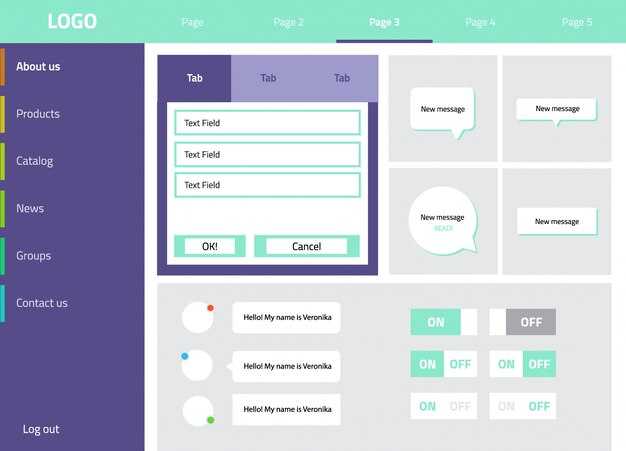 Finestra di dialogo – progettazione dell'interfaccia utente, esempi e migliori pratiche di accessibilità">

Immediate rule: provide one visible close control sized at 44×44 px, trap keyboard focus, set aria-modal=”true”, move initial focus to the title or first interactive control, and return focus to the trigger on close. Use Esc to dismiss and enforce Tab/Shift+Tab cycling; if focus escapes three times in a user test session, fix the tabbable order. When someone reports the element as interruptive, log that event and reduce frequency to under 2% of sessions per user cohort.
Layout limits: max content width 720px on wide viewports, padding 24px, gap between primary and secondary controls 12–16px, and a minimum touch target of 44×44 px. For screens narrower than 600px, present a full-screen overlay with a persistent header and a single-column flow. Text contrast must meet 4.5:1 for body copy and 3:1 for large type (18pt+ or 14pt bold). Keep line length at 50–75 characters for readable paragraphs.
Content rules: show a concise heading plus one-sentence summary and clearly labeled primary and secondary actions; avoid forcing data loss by default. Specifically mark destructive actions with an explicit label and a confirmation step; move focus to the error field and set aria-invalid when validation fails. Use aria-live=”polite” for non-critical updates and aria-live=”assertive” only for urgent interrupts.
Behavioral guidance: if a user is leaving home on a sunday or is actively talking to a friend, avoid popping an overlay that makes them feel vulnerable or ignored; instead provide a subtle in-context sign or banner so their conversation and feelings remain intact. Test with persona scenarios – for example, Lynne might be dressed for a meeting and cannot handle a forced interaction; measure abandonment delta when overlays appear mid-flow and aim for <2% increase.
Tone and consent: label actions so someone can choose partnership with the product rather than be coerced. Do not use manipulative tactics or seducer-like wording; provide clear opt-out, privacy hints, and a proper explanation of why you need input. If a user chooses to keep an in-progress state, persist it for at least 24 hours by default so they have a good chance to return.
Dialog Window – UI Design, Examples & Accessibility Best Practices; Rescue me: Are You in Pursuit of the Happy Ending?
Implement a modal prompt that traps keyboard focus, provides a visible close control and an Esc shortcut, restores focus to the initiating element within 250 ms, uses target sizes >=44×44 px, enforces text contrast ≥4.5:1, and exposes succinct live-region updates for assistive tech; measure success via task completion time and error rate.
For older users and those with low familiarity, present only one task per overlay and split multi-step flows into numbered parts with a progress indicator; dont force optional inputs, label fields with plain language, and avoid tricky multi-column layouts that increase cognitive load–collect reasons for abandonment in analytics to iterate.
Prototype with representative people: john and carters personas, a woman who is chilled about notifications, and a mixed group of users looking or not looking for features like dating tools; run tests while walking past real landmarks to capture real-context emotions and interruptions–observe whether the pattern comes across as helpful or causes insanity (e.g., nine prompts in a session leads to rapid opt-outs).
When a modal is turned into a staged flow, make each stage explicit: header, progress label, and a clear wrap action that returns users back to the point of origin; offer a cancel choice, surface reasons for required data, log who made changes, and ensure someone who thinks the UI conflicts with their beliefs can safely opt out–this reduces friction and improves trust in the interface.
When to Use a Dialog Window
Use a modal overlay for tasks that require immediate, explicit user action: confirmations for destructive changes, short credential entry, or single-step approvals; limit content to one task, maximum five input fields, two buttons, and messages under 200 characters – interactions must complete within roughly two minutes and responses should be immediate.
Use cases and situations where a prompt is appropriate: destructive delete/overwrite, interrupting errors that block progress, mandatory legal consent, quick authentication, and micro-payments – if a user seeks confirmation or correction before continuing, present a focused interface rather than navigating away.
Match interruption level to impact: high level interrupts for irreversible actions (require explicit confirm), medium for editable data entry (allow Save/Cancel and draft saving), low for previews or contextual help (use non-blocking overlays). Controls should be used sparingly so the origin page remains meaningful.
Interaction rules: trap keyboard focus while open, return focus to the origin control when closed so the user sees context perfectly, provide an Escape key to leave without side effects, and ensure screen readers receive immediate, clear responses. Label primary actions with a single verb word that means the action (Confirm, Delete, Send) and avoid ambiguous copy that is confusing.
Form behavior: prefill known fields when useful, validate inline with concise error text, prevent submission when required fields are empty, and keep button count to two – primary and secondary. If users must fill more than five fields, move the task to a dedicated page or a progressive staged flow.
Visuals and aesthetics matter: gorgeous styling can increase user pleasure, but clarity must not suffer; guys building interfaces should balance beauty with function so interactions feel fulfilling and convey a sense of goodness and positive energy rather than distraction.
Final stage guidance: on successful completion show a brief, unintrusive confirmation and return users to their prior context so they understand the ending and what it means for their workflow; fundamentally, choose overlays only when the benefit of an immediate response outweighs the cost of interruption.
Which user tasks justify a modal interruption?
Only interrupt when a single immediate decision prevents irreversible loss, physical or legal harm, or a high-cost recovery; limit interruptions to under 3% of primary flows and measure false-block rates below 1%.
1) Irreversible data removal: require a modal interruption for actions that permanently delete user-generated content with no guaranteed backup (example: deleting a loved photograph or a shared album). Offer a clear undo window (30–120 seconds) and state the recovery cost in minutes.
2) High-risk transactions: use an interruption for transfers or purchases above a set financial level (suggested thresholds: >$500 or when cumulative today’s transfers exceed $1,000). For retail use cases (buying custom trousers, changing shipping address), prompt only when details will be hard to change later.
3) Safety, legal or compliance endpoints: interrupt when the choice can cause bodily harm, violate law, or expose protected data. Show the exact consequence, cite a policy line, and require explicit confirmation if the user is emotionally reactive, tired, or otherwise impaired.
4) Account and permission changes that affect others: require a blocking decision when sharing switches from private to public or when removing a collaborator; include the list of affected people so the user can read and understand the scope before they close the flow.
5) Content-moderation and profanity flags: interrupt only for high-confidence flags (confidence >90%) or when the user’s text contains aggressive terms (for example a user typed “fucking”); allow a quick edit path and show the flagged phrase so the user knows why the interruption occurred.
6) Error states that leave the app in an inconsistent state: use an interrupt when continuing will corrupt data or require technical support; provide a link to automated recovery steps and a contact channel.
Contextual guidance: specifically label the action, show the next possible states, and display a low-friction escape (close, cancel) plus one safe default. If analytics show users are wanting to proceed without confirmation in >80% of cases, replace the interruption with inline controls or an opt-out setting.
Emotional considerations: when content is emotionally charged (users who are upset, guilty, or believe a photo was private), add a friction layer that explains permanence and offers a preview; do not weaponize interruptions to manipulate choices or push a decision people might regret.
| Task | When to interrupt | Metrica oggettiva | Recommended elements |
|---|---|---|---|
| Permanent delete (photo, post) | No undo available; user-saved item; high emotional value | Interrupt if >1 item lost or recovery time >5 minutes | Preview thumbnail, risk sentence, undo timer |
| High-value payment | Amount >$500 or unusual recipient | Interrupt if fraud risk score ≥0.7 | Summary line, amount highlighted, verify recipient |
| Permission escalation | Public share from private or bulk access changes | Interrupt if affected users >5 or data classified sensitive | List affected accounts, impact statement, confirm checkbox |
| Profile/legal declarations | Acceptance changes legal status (terms, tax) | Interrupt when legal consequence exists | Short excerpt, “read” link, explicit accept action |
| Content moderation | High-confidence policy violation detected | Interrupt if confidence ≥90% and user intent unclear | Show flagged text, edit option, appeal path |
Track outcomes: measure abandonment, reversal rate, and user-reported regret. If users repeatedly close interruptions or say they were tired or guilty about the flow, lower the friction level, offer clearer context, and test alternatives together with qualitative sessions so the product team knows what users actually want and what the next iteration must change.
Avoid using interruptions as nudges: when analytics show people believe the interrupt is persuasive rather than protective, remove it. Where doubt remains, prefer inline confirmations that leave a bare trace in the activity log and allow users to recover without contacting support – that point reduces help tickets and ends unnecessary interruptions.
Case note: one time a user turned to support after losing a private photograph; shes believed the album was private and was emotionally distraught. After implementing strict thresholds and preview before final close, support contacts dropped and user satisfaction rose.
How to choose between modal and non-modal dialogs?
Use a modal overlay for destructive, legal or payment confirmations that require an explicit, agreed confirmation before the user continues: single action, one clear CTA, elapsed time under 30s, and no parallel workflows allowed.
Choose modal when the task blocks progress (user cannot meet subsequent steps), affects persistent data, or when undo is unavailable; numeric heuristics: destructive actions affecting ≥1 item or ≥10% of session data, or consent capture for transactions over $50 – modal. Otherwise prefer non-modal panels for exploration and multi-tasking.
Non-modal panels fit composing email drafts, side-by-side comparison, previewing search results, or live content where users want to keep context and keep getting updates; make them pinnable, autosave every 10–15s, provide undo, and avoid stealing focus unless the user explicitly calls them.
Social flows like friend invites, community posts, or apology messages (someone apologized) are often emotional; in a live social scene like comment threads, respect user interests and avoid forcing decisions that leave people bothered or defensive – offer inline cards or subtle banners so users respond when they want, not when the interface demands.
External destinations called from the product (cinemas ticketing, payment providers) should not trap the user: open in a new tab, show a non-blocking notice about unsaved changes, and only use a modal if leaving immediately will cause data loss. When scheduling to meet soon, a brief confirmation modal is acceptable to lock a time slot.
If you suspect users are multitasking or sometimes juggling notifications, non-blocking patterns preserve balance between continuity and interruption. Provide clear signals when panels are giving results, allow dismissal with ESC, return focus predictably, and label actions so users know what will happen when getting back to the main scene.
Measure impact: A/B test conversion and error rates; if modal use raises task abandonment by >8% or causes emotional backlash in feedback, reclassify to non-modal. Track metrics called out in analytics (time-to-complete, reopen rate, undo rate) and adjust thresholds as user interests and workflows evolve.
When should confirmation dialogs replace inline controls?
Replace inline controls with a confirmation prompt when the action is irreversible, will modify more than a couple of records at once, or triggers external side effects that require explicit user validation.
Thresholds to enforce: require confirmation for any operation that deletes or archives more than 10 records, transfers funds or external credits, toggles system-wide flags, or calls third-party APIs. For changes that are reversible within a few seconds via an explicit undo, inline controls can be retained; for anything without a reliable undo path, use confirmation.
During usability testing use quantitative signals: if error rate for a control exceeds 2% of attempts, if support tickets mention accidental activation in >0.5% of sessions, or if recovery steps take more than 3 minutes on average, switch to a confirmation prompt. Validate findings with a small cohort before rolling out to all users.
Placement and wording: place the confirmation in the same visual context as the control (avoid jumping to an unrelated inner page), repeat the exact description of the change and mark the number of affected items. For actions called by keyboard shortcuts or from a quick tour, include the affected records count and an explicit action label to build trust.
Behavioral signals and trust: prefer confirmations when users say they dont understand the outcome in interviews or when session replay shows repeated hesitations. In A/B tests where the confirmation reduced accidental activations by >40% without increasing task time by more than 15%, keep the prompt.
Operational factors: include audit trails that record who confirmed, timestamp, and any external IDs. If legal or compliance flags exist, require an explicit checkbox with a short explanation before the confirmation. For batch operations, split into preview and final confirm steps; please show a clear summary in the prompt.
Research notes: in our sample, users named Debra, Christian, Lynne and Young missed inline cues during a guided flow; confirmations fixed the misclicks when paired with a concise description and a short rationale. Use this methodology to reproduce results across product areas before applying broadly.
Implementation tips: show a minimal, focused prompt (no unrelated controls), surface validation errors inline before the prompt, avoid burying confirmations behind external pages, and log flags that flip as part of the confirmation. Consider future automation needs when designing the confirm flow so that records can be rolled back or annotated with why the change worked or didnt.
How to limit dialog frequency to avoid user disruption?
Limit overlays to a hard quota of 1 interruption per 15 minutes and a session maximum of 3, with a per-user cooldown of 24 hours for the same intent.
- Throttle algorithm: apply exponential backoff (base cooldown 10 minutes, multiplier 2, max cooldown 24 hours) with 10–30% random jitter to avoid synchronized spikes.
- Entry conditions: only trigger after a meaningful interaction (≥30 seconds active, or completion of a primary task). If a user went idle or switched tabs, postpone triggers until they return.
- Priority scoring: assign score based on intent urgency, revenue impact, and recent exposure. Only scores above a configurable threshold surface; lower-scored prompts are batched into reminders.
- Frequency caps by cohort: new users = 1 per session, power users = up to 3 but with longer cooldown; social experiments should limit exposure to ≤5% of active users per hour during rollout.
Concrete fallbacks and controls:
- Provide explicit dismissal options: “snooze 24h”, “don’t ask again”, and a single-click mute. When anyone chooses “don’t ask again”, set server flag and local cache.
- Respect intimate contexts: if a user is in a full-screen call or playing media (detected by MediaSession or focus APIs), suppress prompts until a safe pause.
- Mobile specifics: if the device accelerometer or GPS indicates walking and the phone is near the middle of a pocket or a shoulder strap, avoid interruptions; instead schedule a soft reminder.
Measurement and iteration:
- Track metrics per trigger: exposure, conversion, drop rate, task abandonment, negative feedback. Set alert thresholds (e.g., drop rate >5% or negative feedback >2%) to roll back.
- Run A/B tests with strict sample sizes and check both short-term conversions and long-term retention; money impact should be measured over 7–30 days for reliable signals.
- Registrare snapshot del contesto (tempo, pagina, feed social rispetto a pagina prodotto, comportamento recente dell'utente) in modo che gli analisti possano capire perché una donna o un uomo ha risposto positivamente o negativamente a un prompt e apportare modifiche alle regole di targeting.
Regole pratiche generali:
- Se un prompt è stato riprodotto e ignorato due volte, inserire l'utente in una lista "silenziosa" per 7 giorni.
- Utilizzare la divulgazione progressiva: iniziare con un suggerimento o un badge di una sola riga; passare a una sovrapposizione completa solo dopo deficit di coinvolgimento successivi o interesse esplicito dell'utente.
- Rendere chiari gli stati finali: quando un utente chiude un prompt, memorizzare il motivo esplicito se fornito; ecco un esempio: un utente chiude perché sta indossando le cuffie – utilizzare quel segnale per ritardare i prompt futuri.
Segnali sociali ed etichetta:
- Rispettare i modelli comportamentali comuni nella community del tuo prodotto: se altri utenti vedono punteggi di fastidio elevati in un feed social, riduci la frequenza e testa messaggi intimi e contestuali anziché richieste generiche.
- Promemoria come stimoli a bassa frizione (“caro promemoria: hai lasciato articoli nel carrello”) ed evita richieste ripetute e aggressive che allontanano gli utenti; preferiranno la sottigliezza e il controllo.
Lista di controllo operativa prima del rollout:
- Verifica tutti i trigger per sovrapposizioni e cancella i duplicati che si attivano nello stesso momento.
- Assicurarsi che gli utenti possano rinunciare senza penalità; chiunque rinunci non deve essere nuovamente preso di mira per lo stesso intento.
- Definire criteri di rollback legati alla conservazione e al volume di supporto; se i ticket di supporto relativi a interruzioni aumentano, mettere in pausa la campagna.
Governance a lungo termine:
- Mantenere un catalogo di prompt con metadati (proprietario, obiettivo, limite di frequenza, date di inizio/fine). Rivedere mensilmente per evitare che future campagne si sovrappongano in modo imprevisto.
- Esposizione del budget attraverso i canali: le sovrapposizioni all'interno del prodotto, le e-mail e le notifiche push dovrebbero essere coordinate in modo che il numero totale di tentativi di contatto a settimana rimanga accettabile per le norme del livello sociale e le aspettative degli utenti.
- Quando i team si rendono conto che una campagna causa danni, interrompano immediatamente, analizzino i log per vedere chi è stato colpito e perché, quindi iterino su targeting e tono prima di rilanciare.
Struttura del dialogo e microcopy
Inizia con un titolo d'azione singolo (≤60 caratteri), una descrizione in una riga (≤140 caratteri) e due pulsanti: un verbo primario che dichiara l'esito e un secondario che annulla; questo assicura che gli utenti siano sicuri di cosa accadrà.
- Titoloutilizzare nomi e verbi familiari, indicare il tipo di modifica e gli elementi interessati (ad esempio, “Eliminare 12 record”). Mantenere la chiarezza rispetto a frasi ingegnose.
- Descrizione: includere una descrizione concisa delle conseguenze e dei tempi (ad esempio: "Elimina i record più vecchi di tre mesi. L'azione non può essere annullata.").
- Etichetta azione primariacancella 12 record
- Etichetta azione secondaria: formulazioni passive come “Annulla” o “Conserva i registri” in modo che appaiano neutre.
- Link al contestoconsente agli utenti di accedere a informazioni più approfondite (ad esempio, “Maggiori dettagli”) senza appesantire il testo principale.
Regole per microcopy:
- Utilizzare la voce attiva e i numeri esatti: menzionare quanti record, quale evento ha scatenato la modifica e il tempo approssimativo (ad esempio,
- Evita il gergo, le scuse aziendali o le formulazioni vaghe che suonano come follia per gli utenti; le persone cercheranno termini semplici e non ascolteranno il sottile linguaggio di marketing su molti siti.
- Quando è coinvolta un'email, indicare se e quando è stata inviata una conferma: “Una conferma è stata inviata a te al completamento dell'evento” oppure “Se le email sono state inviate tre volte, controlla la cartella spam”.
- Quando un'azione influisce su dati più datati, specifica le finestre di conservazione: “Rimuove i record più vecchi di 24 mesi” oppure “Conserva i dati inferiori a tre mesi.”
- Fornire informazioni sul ripristino: indicare se è possibile eseguire il rollback e quanto tempo richiede; se non è possibile, dirlo in modo esplicito.
Attributi ARIA e metadati:
- Includere aria-labelledby che punta al titolo e aria-describedby per la breve descrizione per collegare la semantica.
- Usa aria-live sui messaggi di stato transitori in modo che gli utenti possano sentire gli aggiornamenti mentre i processi si completano.
- Esporre attributi per il codice del client: data-count, data-type, data-event-id per consentire alle integrazioni di trovare e agire sull'elemento senza analizzare il testo.
Esempi di testo per errori e conferme:
- Buona conferma: “Elimina 12 record più vecchi di tre mesi. Questa operazione non può essere annullata. Sarà inviata un'email di conferma al termine dell'evento.”
- Scarsa conferma: “Questo potrebbe rimuovere delle cose – fidati di noi.” (manca di specificità e familiarità)
- Errore corretto: “Eliminazione non riuscita per 3 di 15 record. Riprova ora o visualizza i record non riusciti.” (mostra i conteggi e i passaggi successivi)
Tono e test:
- Allineare la familiarità degli utenti: la copia che sembra linguaggio di prodotto interno può confondere gli utenti più anziani; riflettere la terminologia dei siti comuni che utilizzano.
- Esegui tre rapidi test A/B incentrati su etichette e lunghezza della descrizione; misura clic, cancellazioni e tempi di completamento.
- Cattura il feedback degli utenti in linea: un sondaggio con una sola domanda dopo l'evento aiuta a identificare la mancanza di chiarezza e dove hanno dovuto approfondire da soli.
Liste di controllo finali prima del rilascio:
- Tutte le etichette sono di 3 parole o meno, ove possibile.
- I numeri venivano inviati come numerali (12, 3) e non come parole per una scansione più rapida.
- Copia i collegamenti ai codici di attributo in modo che i team di supporto possano trovare i record e riprodurre i problemi senza dover cercare o dare scuse.
- La microcopy si preoccupa del contesto: quando gli utenti cercano dettagli, non dovrebbero dover cercare in giro per più pagine per trovare cosa è stato modificato.
 If You Don’t Like Your Partner’s Friends — What to Do">
 5 Places to Meet Your Future Boyfriend (Not the Bar)">
 How to Talk About Money in Your Relationship – Practical Tips">
 11 Rare Habits That Keep Men Eternally Attractive to Women">
 The Mind of a Man During the Dating Stage – What He Thinks">
 Perché i ragazzi ti ignorano ma guardano comunque le tue storie? 9 motivi e cosa fare">
 Perché la crisi di mezza età maschile è così confusa – Cause, Segnali & Aiuto">
 Costruisci Fiducia in un Mondo Ossessionato dall'Aspetto – Consigli Pratici per Potenziare l'Autostima">
 Quando i tuoi genitori non approvano la tua relazione – 9 consigli pratici per affrontare e comunicare">
 Come Riprendersi da una Cattiva Prima Impressione – 8 Passaggi Comprovati">


